Prime Video
- 3.1
- Rating
- 100.00M
- Installs
- Free
- Price

 Analysis by App-foxy
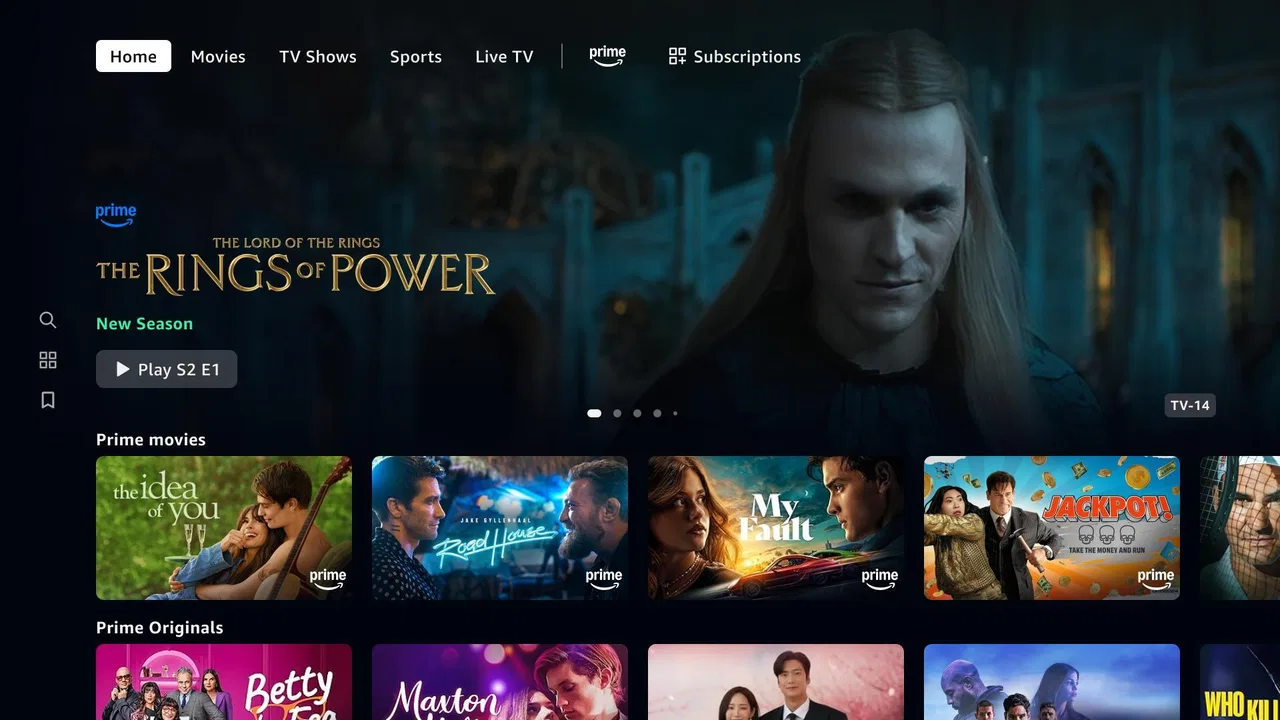
Prime Video is the kind of entertainment app I open when I want one place for films, television shows, live programming, and sports rather than a separate service for every type of viewing. My overall impression is positive but qualified: it is a useful, broad streaming companion, especially for people already interested in Amazon’s video catalogue, yet it is not so polished or consistently easy to navigate that I would recommend it blindly to everyone.
That balance matters because the app’s value depends heavily on what you want to watch. If your priority is having a large screen-friendly library and the option to discover live content alongside on-demand titles, it has a convincing case. If you want the cleanest interface, the simplest subscription experience, or a service built around one very specific kind of programming, another option may feel more comfortable.
What using Prime Video feels like day to day
Developed by Amazon Mobile LLC, this free entertainment app brings Prime Video viewing to compatible Android devices. It is rated for Teen audiences, supports devices running Android 5.0 or later, and has reached over 100 million installs. Those figures suggest that it is not a niche player; it is a mainstream way to access Amazon’s video service on a phone or tablet.
You May Also Like

 AccuWeather: Weather Radar
AccuWeather Review: A Quick, Clear Forecast for Everyday Decisions
For everyday plans, the best forecast is the one you can understand quickly. AccuWeather makes rain timing, radar, and local conditions easy to act on, with a few trade-offs.

 Hill Climb Racing
Why Hill Climb Racing Still Turns Crashes Into One More Run
A tiny car, a bumpy hill and one more upgrade: Hill Climb Racing keeps resurfacing because its simple chaos makes every near-miss feel personal.

 AliExpress - Shopping App
AliExpress Makes Global Shopping Feel Personal, but Shoppers Bear the Risk
AliExpress turns a global marketplace into a pocket-sized discovery engine. Its reach is useful, its shopping loop compelling, and its trade-offs easy to miss.

 Lords Mobile: Kingdom Wars
Lords Mobile Is a Kingdom-Building Routine, Not a Quick Match
A case-by-case verdict on the building, battles, device demands, and social commitments that make Lords Mobile rewarding for some players and exhausting for others.

 PDF Scanner app - TapScanner
TapScanner Makes Paperwork Easier to Capture, Check, and Share
TapScanner makes scanning with a phone feel less like a rescue operation and more like a dependable step in getting work done. Its capture tools are useful, though not flawless.

 Block Blast!
Block Blast! Shows How Much a Puzzle Game Can Leave Out
A quiet grid game shows why puzzle players increasingly value instant clarity, repeatable skill and low-pressure play—and where the genre still needs to catch up.
More From Our News Desk
View All News


The first thing I noticed is that the app works best when I treat it as a viewing hub rather than a simple catalogue of included titles. The presence of movies, series, live programming, and sports gives it range, but that range can also make the browsing experience feel less focused. I may begin looking for a film and end up comparing it with a series, a live event, or content that belongs to a different viewing arrangement.
That variety is helpful for households with different habits. One person can use the app for a film night, another can look for an episode to continue, and someone else can check live programming. I would not call the experience frictionless, though. The more categories I move through, the more important it becomes to pay attention to what I am selecting and how it fits into my existing access.
My main takeaway is that Prime Video is strongest when convenience and breadth matter more than perfect organisation. It gives me plenty to investigate, but it expects me to spend some time deciding what is actually suitable for my needs instead of presenting every choice with equal clarity.
Why the broad catalogue is genuinely useful
The app’s biggest practical strength is flexibility. I can use it for a planned evening, a quick episode during a break, or a live programme that I want to follow as it happens. Many streaming apps are excellent at one of those jobs and less convincing at the others. Prime Video attempts to combine them, which makes it more useful in a mixed household or for anyone whose viewing habits change from day to day.
A realistic example is a weekday evening when I have only a short amount of time. Rather than committing to a long film, I can look for a television episode. At the weekend, I may want a film or live sports instead. The same app remains relevant, even though the decision-making process changes. That reduces the need to switch between several entertainment apps, provided the content I want is available through my access.
It is also convenient for people who watch on a tablet while travelling around the home. A phone is not the ideal screen for every film or sporting event, but it is useful for catching up in bed, following something while away from the television, or checking whether a programme is worth watching before settling in front of a larger display.
Another strength is that the app does not force me into one narrow definition of entertainment. Someone who only wants scripted series might prefer a more specialised service, but I appreciate having movies, shows, live programming, and sports represented in the same place. That broad approach is particularly useful when I am choosing something for more than one person, because different viewers can have very different ideas of a good evening.
Small habits that make browsing less frustrating
I found that browsing works better when I begin with a clear intention. Searching for a specific title is usually more efficient than scrolling without a plan, especially when I am short on time. If I am open to discovery, I try to decide first whether I want a film, a series, or live content. That simple choice reduces the feeling of being surrounded by an endless mixture of options.
For a shared household, I would also make a short list of possible choices before everyone sits down to watch. This sounds basic, but it avoids the familiar situation where several people browse for too long and lose interest. Prime Video offers enough variety that indecision can become the main obstacle, not a lack of entertainment.
When I am considering a title, I pay attention to the viewing context rather than assuming that every item follows the same access rules. The app combines different kinds of video availability, so I check the title’s presentation before settling on it. This is an important habit for families and for anyone trying to avoid an unexpected purchase or an unsuitable choice.
The same caution applies to sports and live programming. Live viewing has a different rhythm from on-demand video: timing matters, and missing the beginning can change the experience. I would open the relevant section early, confirm what I want to watch, and avoid leaving the decision until the programme is already starting.
The meaningful weakness: discovery is not always effortless
My biggest criticism is not that Prime Video lacks things to watch. It is that the abundance can make the route to the right thing less direct than I would like. A service that combines several content types has to organise them somehow, and the result can feel busy when I am simply trying to make a quick choice.
This affects the app most when I am browsing casually. A focused service can feel calmer because its identity is obvious. With Prime Video, I sometimes need to distinguish between what I am interested in, what is included for my situation, and what is merely being presented as another option. That extra mental step is manageable, but it is still friction.
I also would not choose it solely because it is free to install. The download costs nothing, but the viewing experience is connected to the wider Prime Video offering, and the app includes in-app purchases ranging from a few cents to several hundred dollars per item. I would therefore treat the installation price and the possible cost of individual viewing choices as separate questions.
That does not make the app poor value. It simply means that a careful user should understand the difference between opening the app and gaining access to every title displayed inside it. Before starting a film, series, live programme, or sports event, I would check the way it is offered. This is especially important when children use the device or when several people share one account environment.
The Teen content rating is another reason I would not hand the app to a younger child without supervision. The rating does not tell me that every item is unsuitable for every family, but it does make it clear that the catalogue should not be treated as a children-only space. Parents should guide what younger viewers open rather than assuming that a familiar streaming interface is automatically appropriate.
Useful trade-offs compared with other streaming choices
Compared with a service built mainly around on-demand films and series, Prime Video has the advantage of combining those formats with live programming and sports. That makes it more versatile for a household that wants one entertainment destination. The trade-off is that the interface and browsing logic may feel less specialised.
Compared with a free, ad-supported video platform, Prime Video can feel more intentional for people who want a conventional streaming library and live viewing in one app. On the other hand, a free platform may be a better fit for someone who does not want to think about subscriptions, rentals, purchases, or title-by-title access.
Compared with a sports-first service, Prime Video is broader but less focused. I would choose it when sports are one part of my viewing rather than the only reason I am subscribing or opening the app. A dedicated sports option may be better for a fan who wants deep coverage and spends most of the week following live events.
Compared with a television-focused service, Prime Video’s inclusion of films and sports gives it a wider role. The cost of that flexibility is that I may need more patience while deciding what to watch. In my experience, it is a strong generalist rather than the undisputed specialist in any single category.
Who should use it, and who should skip it
I think Prime Video is a good match for viewers who want variety and already have a reason to use Amazon’s video ecosystem. It suits people who alternate between films, series, live programming, and sports, as well as households where different viewers want different things. It is also practical for anyone who values being able to watch on a mobile device rather than limiting viewing to a television.
I would recommend it less enthusiastically to someone who wants a very simple catalogue with no ambiguity about access. If your ideal experience is opening an app, seeing only included titles, and making a decision in seconds, the broader Prime Video presentation may test your patience. A more focused service could be easier to understand even if it offers fewer types of content.
It may also be the wrong choice for a viewer who cares almost exclusively about one genre or one sport. Prime Video’s breadth is useful only when you will actually use that breadth. Paying attention to several content areas can be a benefit for one person and unnecessary clutter for another.
For families, I would use it with a little planning. The Teen rating means I would review viewing choices for younger users, and I would explain that not everything shown in the app should be assumed to be included in the same way. That conversation is more valuable than simply installing the app and letting everyone browse without guidance.
Performance expectations and long-term practicality
The current version is listed as 6.23.23+v15.5.0.70-armv7a, and the minimum Android requirement is 5.0. For someone using an older compatible phone or tablet, that support range is helpful. Still, the quality of the experience will depend on the device, display, connection, and the type of content being watched. A live sports stream places different demands on my attention than a short episode viewed casually.
I would also consider the size of the screen before making the app central to my viewing. A phone is convenient, but films and sports are easier to appreciate on a larger display. The mobile app makes access more flexible; it does not remove the basic compromise between portability and comfort.
One practical advantage is that I can make the app part of an existing routine instead of treating it as a special destination. I might check it while commuting, choose something during lunch, and watch later on a more comfortable screen. That separation between choosing and watching reduces the pressure to browse endlessly when I am tired.
For travel, I would plan ahead rather than assume that every viewing situation will be equally convenient. Live programming depends on timing, while on-demand viewing is naturally more flexible. The app is most useful when I match the type of content to the time I actually have, instead of expecting every part of the catalogue to work the same way.
My final recommendation
Prime Video is a capable, wide-ranging entertainment app with a clear strength: it brings movies, television shows, live programming, and sports into one mobile viewing experience. I like it most when I want flexibility and do not want my entertainment choices divided into several narrowly defined services.
Its limitations are equally clear. Browsing can require patience, the presence of in-app purchases means I would check access carefully, and the Teen rating makes it unsuitable as an unsupervised children’s catalogue. The app’s free installation should not be confused with unlimited access to every item presented inside it.
Amazon Mobile LLC has built a useful general-purpose option, but my recommendation depends on your habits. If you want a broad streaming companion and are willing to spend a moment understanding the catalogue, I think it is worth trying. If you prefer a quieter, more specialised, or completely straightforward viewing service, another option may serve you better.
With an average rating of 3.1 from around 38 thousand ratings and roughly 1 thousand written reviews, the public response appears mixed rather than universally enthusiastic. That matches my own conclusion: Prime Video is valuable for range, not perfection. I would recommend it to viewers who will genuinely use its mixture of on-demand and live entertainment, while advising everyone else to choose based on their actual viewing routine instead of the size of the catalogue alone.
FAQs for Prime Video
01What devices are compatible with Prime Video?
Prime Video is compatible with a wide range of devices, including Android and iOS smartphones and tablets, smart TVs, game consoles, and streaming devices like Amazon Fire TV and Roku. This flexibility ensures that you can enjoy your favorite movies and shows on virtually any device you own.
02Does Prime Video offer offline viewing?
Yes, Prime Video allows you to download select movies and TV shows for offline viewing. This feature is available on both Android and iOS devices, making it convenient to watch your favorite content without an internet connection, perfect for travel or areas with limited connectivity.
03What type of content is available on Prime Video?
Prime Video offers a diverse library of content, including popular movies, exclusive TV series, documentaries, and kids’ shows. Additionally, it features Amazon Originals, which are exclusive to the platform, ensuring a unique viewing experience with something for everyone.
04Is there a free trial available for Prime Video?
Prime Video typically offers a 30-day free trial for new users. This trial period allows you to explore the platform’s features and content offerings without any commitment, giving you a risk-free opportunity to decide if the service suits your entertainment needs.
05How is Prime Video’s streaming quality?
Prime Video supports a range of streaming qualities, including 4K Ultra HD and HDR for select titles. The streaming quality automatically adjusts based on your internet connection to ensure smooth playback, providing the best possible experience whether you’re on a mobile device or a large screen.
Pros
- Wide selection of movies and TV shows.
- Offline viewing available for convenience.
- User-friendly interface and navigation.
- Affordable subscription options available.
- Supports multiple profiles for family use.
Cons
- Limited original content compared to competitors.
- Some titles require additional purchase.
- Interface can occasionally be glitchy.
- Content availability varies by region.
- Ads for other Amazon services can be intrusive.

Prime Video
Gallery